

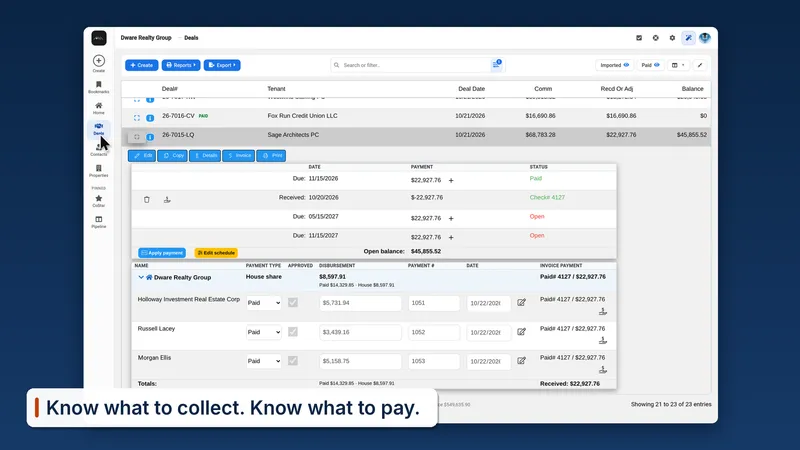
Enter the deal once.
Add the lease or sale with its rent schedule, parties, and dates. RE Deal Tracker calculates the commission, splits it among your salespeople, co-brokers, and the house, and builds the closing sheet.

For small and mid-sized commercial brokerages
Know what you'll collect, what you owe, and which leases are up for renewal. Enter each deal once.

Built for the principal and the office manager, with every deal, invoice, and payout in one record.
Every deal shows what's been billed, what's been paid, and what's past due, installment by installment.
See what each salesperson and co-broker is owed and what's already been paid out.
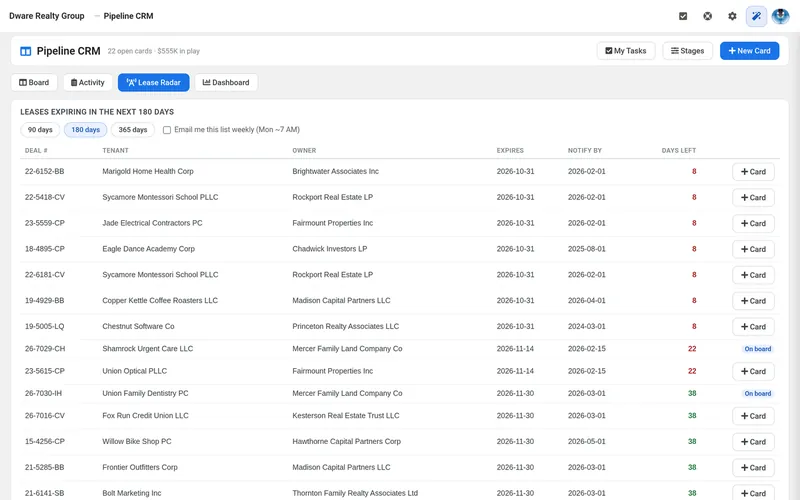
See which leases are coming up for renewal before the tenant calls.
On Office and Enterprise, agents can check their own deals from any phone or tablet browser.
Walkthrough
2-minute video. No sign-up.
Here's what happens to a lease after you enter it.
Add the lease or sale with its rent schedule, parties, and dates. RE Deal Tracker calculates the commission, splits it among your salespeople, co-brokers, and the house, and builds the closing sheet.
Set the payment schedule once and print an invoice for each installment. Apply checks as they arrive, and every deal shows what's paid and what's past due.

See what each salesperson and co-broker is owed and what's been paid. Missing payouts are flagged before anyone gets left out.

Every deal keeps its renewal date and notice period, and the Renewal report lists what's coming up, on every plan. On Office and Enterprise, Lease Radar counts down the days to each expiration and turns a renewal into a pipeline card.
When an established commercial real estate brokerage couldn't find software that fit the way its office worked, it partnered with Dataware Systems to build it. Its experienced office staff helped define and refine the workflows—from commission splits and installment billing to collections, agent payouts, and renewals.
That brokerage has used RE Deal Tracker for more than two years. We've continued improving it and expanding its capabilities, with the same goal: give commercial brokerage teams a clearer view of their deals and their money.
Office: $499/month, billed annually. Up to 10 users, standard setup, and guided onboarding included. Additional users available. Solo and Enterprise plans also available.
About two weeks, depending on migration scope. Standard setup and guided onboarding are included. Importing existing data is a separate service, quoted in advance.
No. Standard setup is included with every plan. We configure your company, users, permissions, and email connection, then guide your team through entering deals, billing, and payouts in a remote onboarding session. Importing existing data is a separate service, quoted in advance. Setup usually takes about two weeks, depending on migration scope.
No. RE Deal Tracker tracks the commission side of your deals: what's owed, billed, collected, and paid out to whom. Your general ledger and tax work stay in QuickBooks or your accounting software. Every plan exports to Excel and PDF, and Office and Enterprise sync with QuickBooks Online.
On Office and Enterprise, only if a manager allows it, person by person. By default, agents see their own deals.
Each brokerage's records are kept private and separate. Access is controlled by role, and managers decide which agents can see which deals. Those rules apply everywhere, including AskAI. More on our security page.
Your data belongs to your brokerage. Built-in exports of your deals, commissions, and billing to Excel or PDF are included with every plan, with no additional fee. If you need an assisted full-data export when leaving, we offer a one-time $500 service in an agreed database or structured-data format; we confirm the contents and format before proceeding. After your paid term ends, we retain your data for 30 days so you can request an export, then delete it from active systems. You can request earlier deletion.
We'll walk you through one sample deal, from commission calculation to payout, and answer your questions.
Prefer to talk now? Call (718) 447-4911
25 minutes. Nothing to prepare. You'll talk with the developer who builds it.