Everything between the signed deal and the final payout

Commission accounting first, then renewals, the pipeline, permissions, and AI, all on the same records.

Deals and the closing sheet

The closing sheet builds itself from the deal you enter and stays current as terms change. It shows deal number, location, parties, size, rent by year or sale price, commission rate, payment schedule, co-broker amounts, option and notice terms, and remarks. Print it or save it as a PDF.

Record leases and sales with full terms. Each deal ties to a property, an owner (landlord or seller), a tenant or buyer, the party to invoice, an attorney, and one or more salespeople.

  • Lease start and end, term in years and months, partial first year, monthly and yearly rent, price per square foot, area size
  • Abated months and amount; renewal date and notice period; cancellation date; purchase option
  • Reminder dates; public notes for the team and private notes for the author
  • Sales: sale price, closing terms, and the same party and commission structure
  • Renew, extend, or copy a deal with the terms carried forward; consistent deal numbers; deal classes for reporting
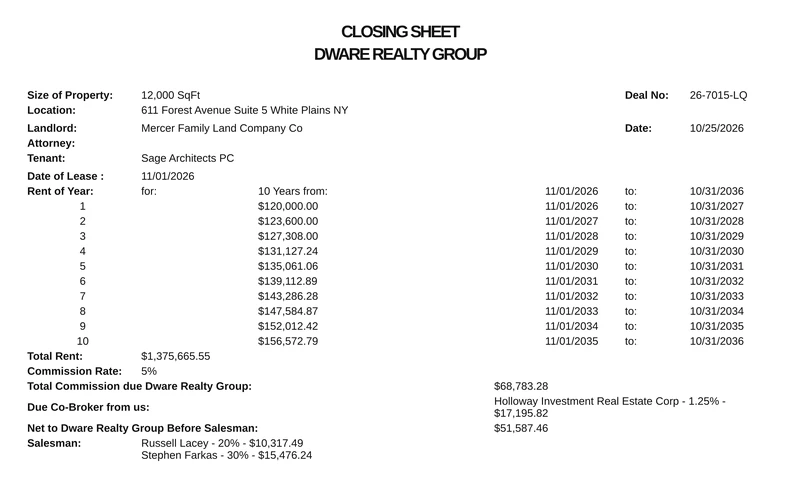
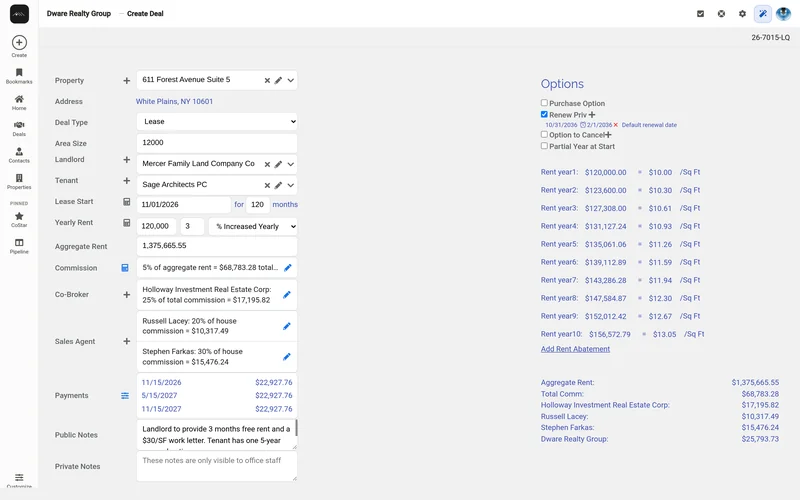
Closing sheet for a 10-year office lease showing rent by year and the commission split among two salespeople, a co-broker, and the house
Every deal produces a dynamic, printable closing sheet.

Commissions and splits

  • Commission per square foot or from the rent schedule, with flexible rates and a rate slider for what-ifs
  • The total commission calculation is explained on screen as you enter it
  • Allocate to each salesperson at their share, to co-brokers (amount due to or from them shown), and to the house
  • Change allocations on a saved deal, with confirmation. You're warned if someone is removed after their payout was created.
Deal entry form for a 10-year lease with rent by year, commission split, and three installments

Billing and invoices

  • Payment schedules: a single payment, a number of installments, or spread over months, with due dates
  • An invoice for each installment
  • Batch invoices across many deals
  • Redistribute payments between installments when a client pays differently, with paid installments protected
Commission invoice for a 10-year lease, with the remaining installments, due dates and open balances
Set the schedule once; invoice each installment.

Collections

  • Apply payments with check number, date, and amount
  • Balance, Paid, and Past due status on every deal; rows expand to show payment and payout history
  • Payment Duplicate Monitor flags suspected duplicate entries
  • Commission Due report
Deals grid showing balances, a paid deal, and one deal expanded to show its installments, the payment received, and each payout
See every deal's balance and whether it's paid or past due.

Payouts

  • Track what each salesperson and co-broker is owed and what has been paid
  • The Disbursement Health check compares payouts with commissions and payments. Missing payouts are flagged before anyone gets left out.
  • Printable disbursement reports per receiver, including the house share
Disbursement Health listing deals with a missing salesperson payout
Missing payouts are flagged before anyone gets left out.

Reports and exports

  • Export the Deals grid (visible columns) to Excel or PDF, or print it
  • Printable closing sheets, invoices, and disbursement reports
  • Renewal and Commission Due reports; Batch Invoices
  • Scheduled emailed reports, daily, weekly, monthly, or on a custom interval
  • CoStar Power Broker submission report

Renewal tracking

Renewal dates and notice periods on every deal, plus a Renewal report for any date range, so expirations stop being surprises. On Office and Enterprise, Lease Radar adds a 90, 180, or 365-day countdown list and turns a renewal into a pipeline card.

Lease Radar on a phone, listing leases expiring in the next 90 days
Lease Radar, on Office and Enterprise.

Lease Radar

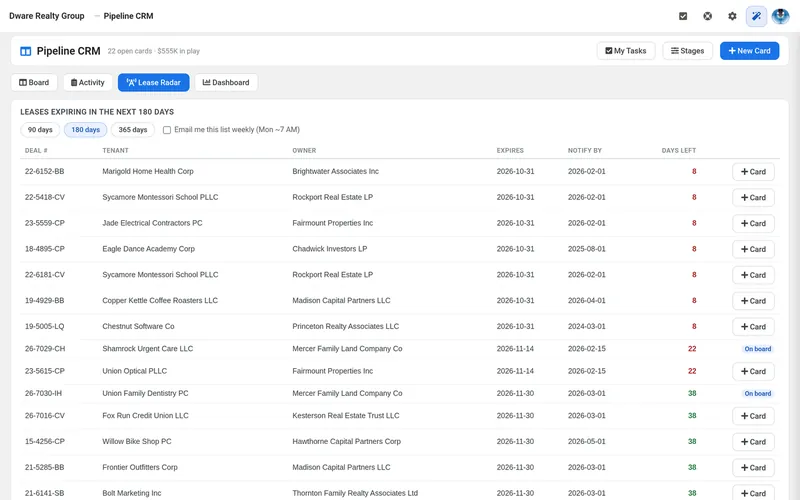
  • Leases expiring in the next 90, 180, or 365 days, with tenant, owner, expiration date, and a days-left countdown (red at 30 days or less)
  • One click turns a renewal into a pipeline card pre-filled with the tenant, original deal, lease end date, and salesperson
  • Optional weekly Lease Radar email
Lease Radar listing leases expiring in the next 180 days, with tenant, owner, expiration date, a days-left countdown, and a Card button to add each renewal to the pipeline
Lease Radar turns expiring leases into your next deals.

Pipeline board

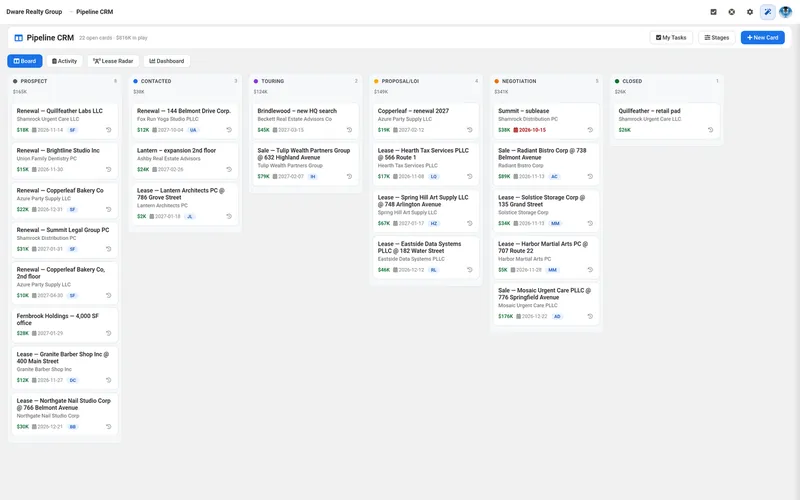
  • A kanban board with stages you can rename and reorder; cards show company, estimated value, expected close date, and salesperson; column totals
  • Managers see the whole board. Agents see their own cards, and colleagues' cards show as locked.
  • Tasks with an optional morning email digest; a card history that merges showings, deals, tasks, and stage moves
Pipeline board with deals across stages from Prospect to Closed and a value total on each column
Drag deals across stages; each column totals its value.

Contacts, properties, activities, and tasks

  • Owners, tenants, co-brokers, and investors, each with their deals and showings; vCard export
  • Property inventory with address, name, city and state, size, attached deals, and a link to the online listing where one exists
  • Log notes, calls, emails, meetings, open houses, and showings; every activity keeps a history of what changed and who changed it
  • Follow-up tasks and reminders, with a My Tasks count and overdue indicator; export showings to calendar files

Roles, visibility, and team dashboard

  • Company Admin, Manager, and Agent roles; everything is scoped to your brokerage
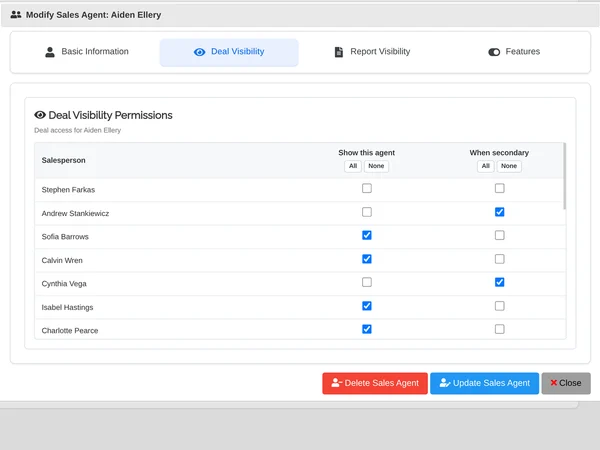
  • Managers set, agent by agent, whose deals each agent can see (per-colleague toggles, Show All / Hide All) and which reports each agent can run
  • Enforced on grids, deal detail, editing, closing sheets, invoices, reports, Lease Radar, and AskAI
  • An agent can't reach someone else's deal by guessing its address.
  • A team activity dashboard of showings, completed tasks, pipeline moves, and closed deals over 7, 30, or 90 days, with click-through to the records, a leaderboard, and per-30-day goals
  • Usage analytics: active users, busiest hours, feature adoption
Deal visibility settings for one agent, with a checkbox for each colleague whose deals the agent can see
You decide, agent by agent, whose deals each person can see.
Pipeline CRM manager dashboard showing 30-day leaderboards for activities logged, tasks completed, cards moved and deals closed
See who's producing over 7, 30, or 90 days.

AskAI

  • A floating assistant on every screen that answers plain-English questions from your brokerage's own data
  • Three modes: Chat, Summarize, and Draft email. It drafts copy-ready text and never sends anything.
  • Managers can ask about their team; agents can only ask about their own work, and the system enforces that rule
  • Uses fixed, approved lookups locked to your brokerage and the user's visibility; many common questions are answered without any AI call
  • AI deal summaries on each deal, with optional emailed summaries when a deal is created or changed
  • Optional AI is included with Office and Enterprise, with 1 million tokens a month.*
AskAI answering which leases expire in the next 90 days, in plain sentences
Ask in plain English; answers come from your own records.

Integrations

  • QuickBooks Online sync. RE Deal Tracker keeps the commission side; your books stay in QuickBooks with your accountant.
  • Excel and PDF: export or print any deal list or report.
  • Your own email: invoices, reports, and notifications go out through your Microsoft 365, Gmail, or SMTP account, under your brokerage's name.
  • CoStar Power Broker: prepare award submissions from your closed deals.

Multi-office

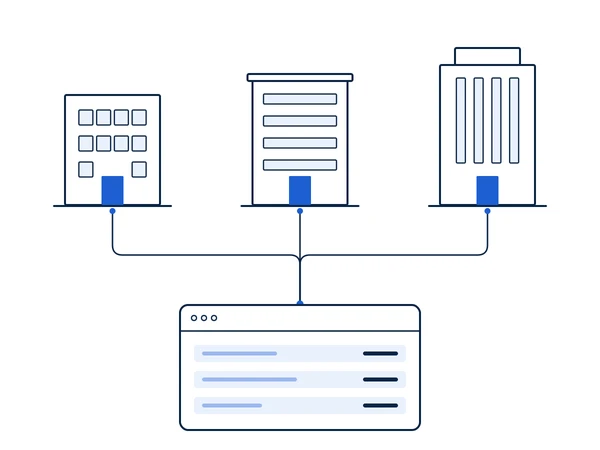
Multi-office support for brokerages with more than one office.

Contact us

Three offices sharing one RE Deal Tracker account

And the rest

  • Event notifications for payment applied, payment deleted, deal status change, and commission update, with your choice of scope, timing, recipients, and a cooldown
  • A built-in, searchable change log of every release; new screens are opt-in per user
  • A personal welcome dashboard, four themes and a Theme Studio, and bookmarks
  • Works in any modern browser on desktop, tablet, and phone; nothing to install

What it doesn't do

We'd rather tell you now:

  • It doesn't store documents or collect e-signatures. Closing sheets, invoices, and reports print or save as PDF.
  • It isn't a general ledger and doesn't do tax work. Your accounting software and accountant keep that job.
  • It doesn't pull listings from CoStar. It prepares Power Broker submissions from your closed deals.